
Inbox basics
See all texts, emails, and chats from every channel in one place.
The Inbox brings every conversation into one screen. You can read and reply to texts, emails, and social messages without switching apps.
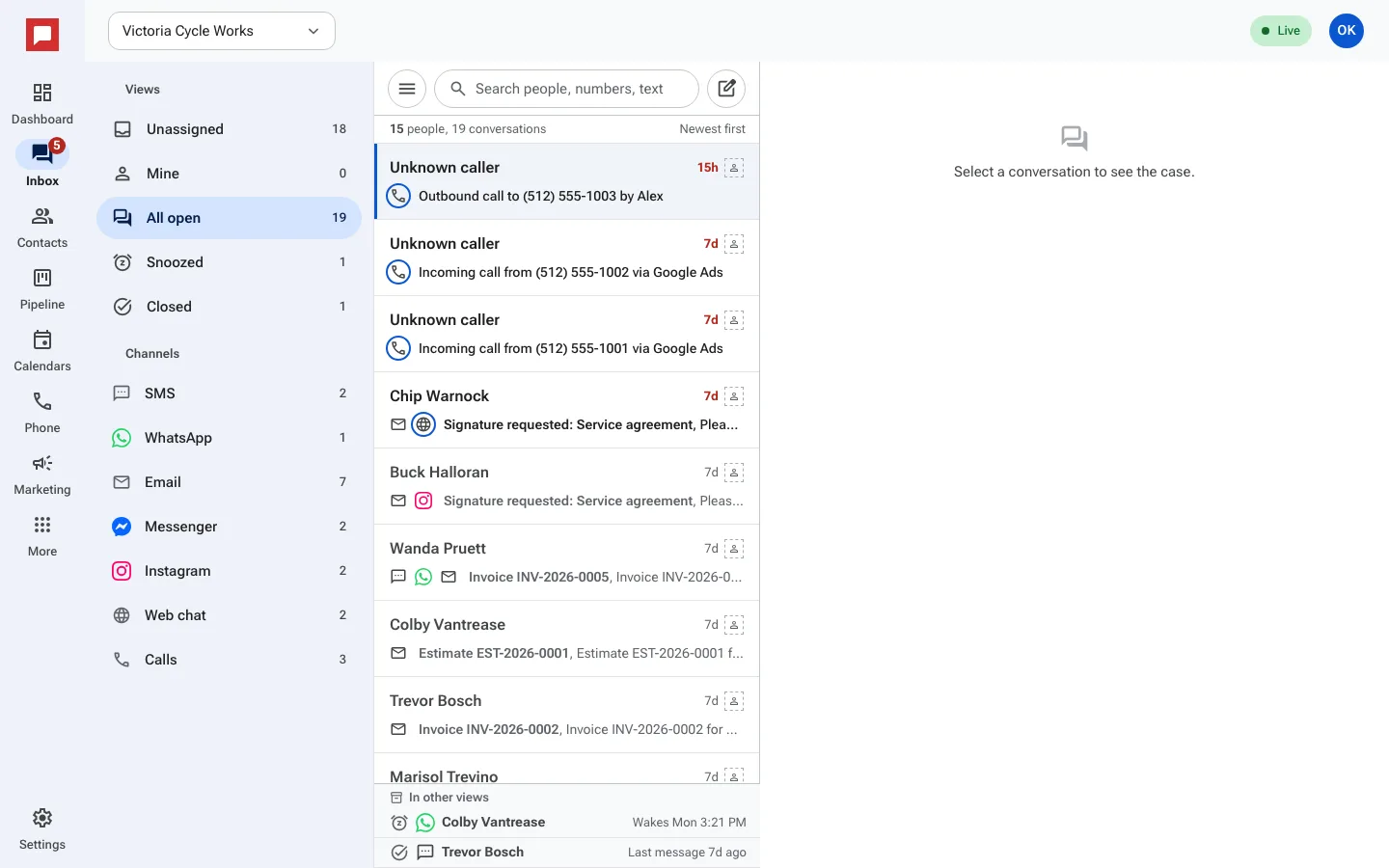
Steps
- Click Inbox in the left icon rail.
- Look at the views rail on the left side of the screen.
- Select All open to see every open conversation, or Mine for the ones assigned to you.
- Select Unassigned to find conversations that no one has claimed.
- Select Snoozed to see conversations you set aside for later.
- Select Closed to review past conversations.
- Click a conversation to open the full thread.
- Read the messages in the center panel.
- Check the contact details in the side panel on the right.
Good to know
- The Inbox supports SMS, WhatsApp, email, Facebook Messenger, Instagram DM, and website chat.
- New messages appear in the list automatically. You do not need to refresh the page.
- Use Mark unread to flag a conversation you want to come back to.
- You can search for a specific person or number using the search bar at the top.